
Appearance
Using the dashboard
What you do with it once it is open: find a project, open it where you work, read what it is holding, and check it when something is off.
Starting and stopping is the pair of buttons on every card, and everything here sits around them.
Finding one
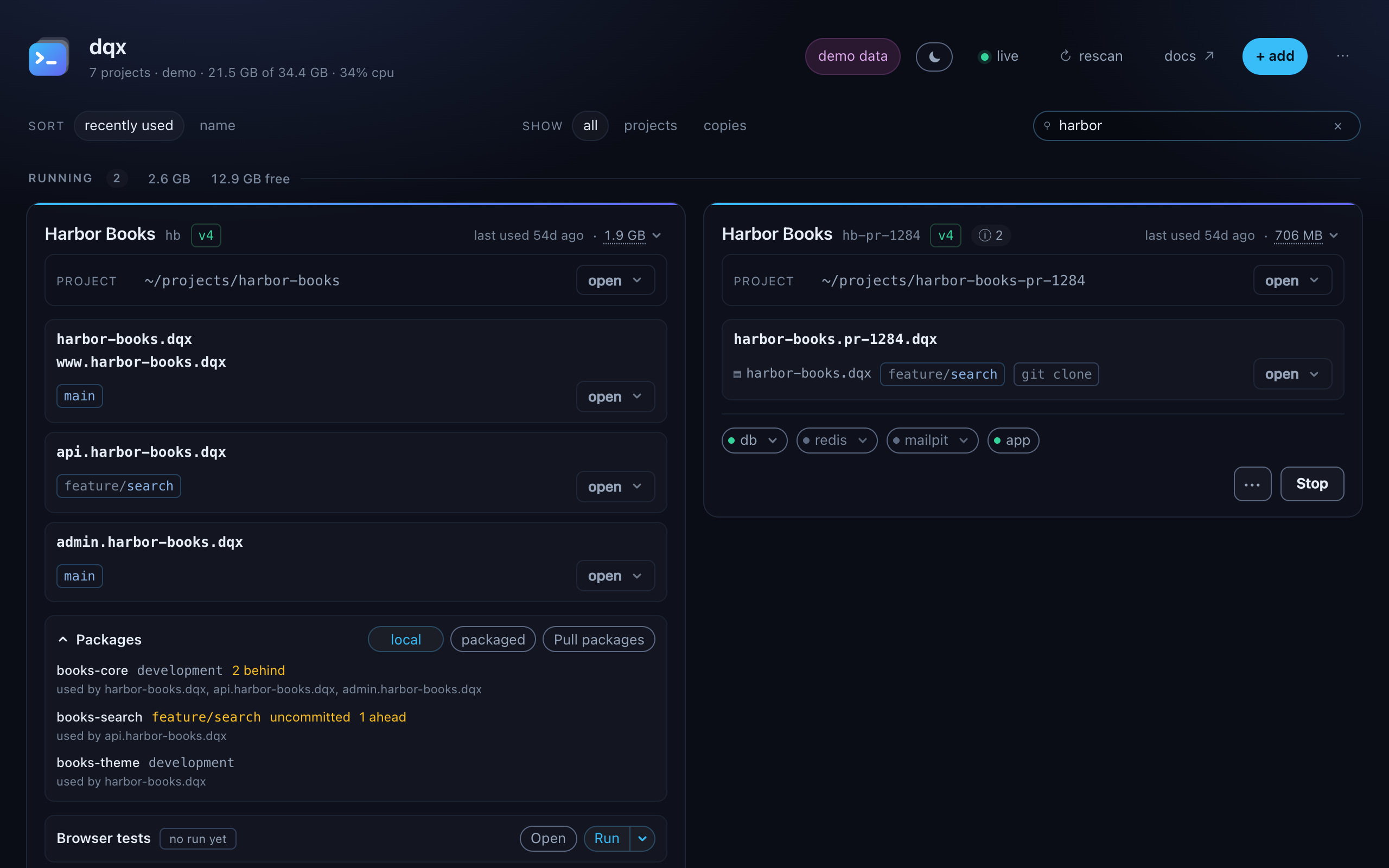
The search box filters on the four things somebody remembers about a project: its name, its client key, a domain it serves, or the directory it is in.
Every word has to match, anywhere. acme api finds the api site of the acme project without anyone knowing whether the domain reads api.acme or acme-api. Case is ignored.
Beside it, show narrows to all, projects or copies. Copies is how you find what an agent left behind without remembering what each one was called.
Clear both with the ×, with Esc, or with the link in the footer, which says how many cards are hidden. The group counts follow the filter, so Running 2 means two of the matches are running.
Not remembered between runs
The sort is; the filters are not. A filter surviving a restart would open the dashboard with most of the fleet missing and nothing explaining why.
Getting to a project
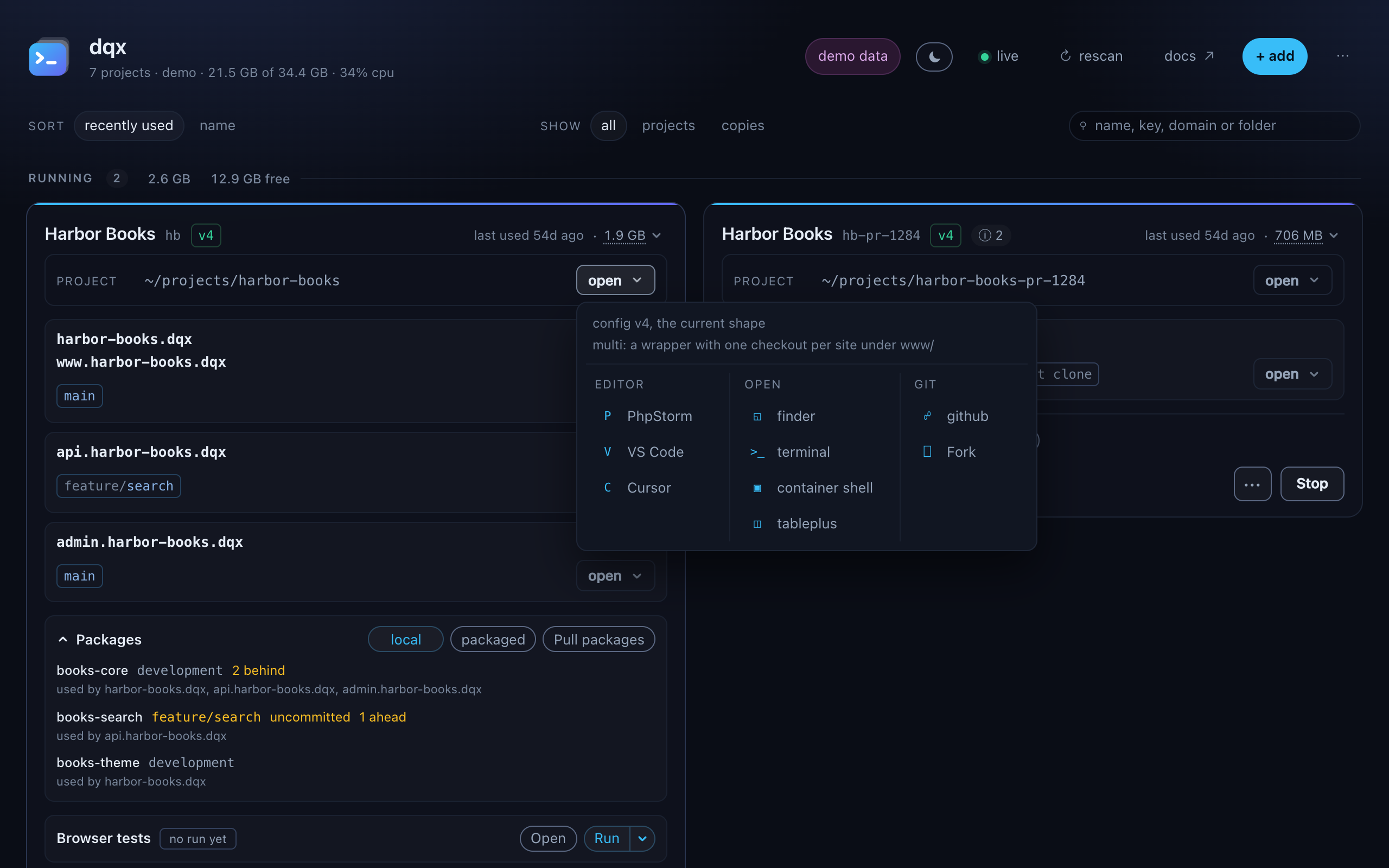
open on the project row and on each checkout opens a panel in up to three columns:
| editor | the editors this machine has; the column is left out when there are none |
| open | Finder, a terminal, a container shell while the project runs, and tableplus while its database runs |
| git | the repository's own page on its forge, on the branch it is on, and the desktop git clients this machine has; there when either exists |
The project row and the checkout rows each have one, because they are not the same question. 41 of the 51 projects here are a wrapper that is itself a clone, and ten of those hold checkouts with no remote of their own.
dqx offers the editors, terminals and git clients that are actually installed. Nothing is installed for you and no editor is invented: a machine with none keeps Finder and Terminal.
The columns are ordered by what you use, counted across this machine rather than per project. The editor somebody reaches for is a habit, not a property of the project they are looking at. The count lives in ~/.local/share/dqx/opened.json.
The project row holds the path, shortened against your home directory; clicking it opens Finder. A project with several sites has an open on every checkout row, always visible, because a site's checkout is not always named after its domain.
macOS only, for now
Finder and Terminal are opened with open and osascript. On anything else these report rather than guessing at a file manager. The path is on the card either way.
The project menu
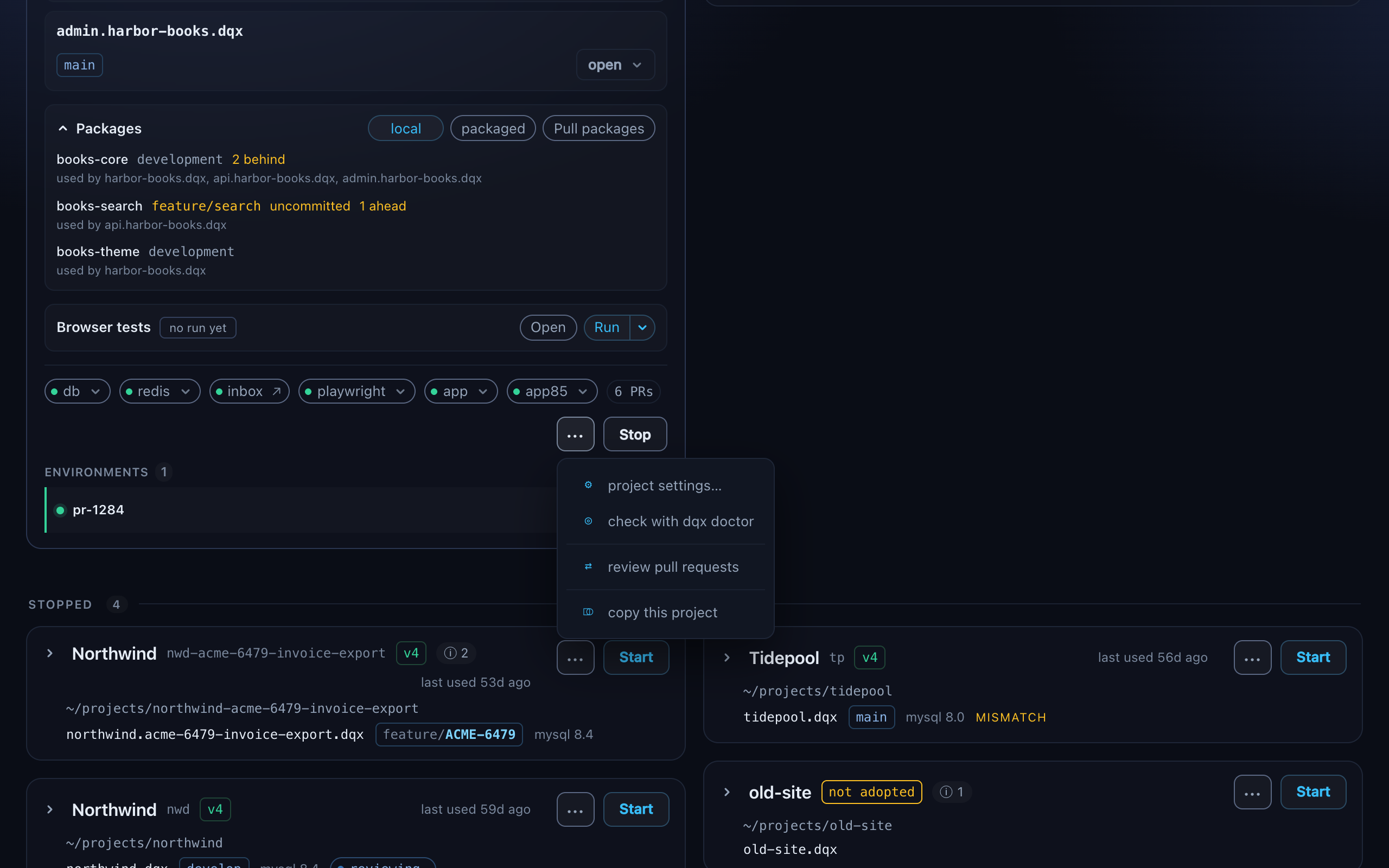
Beside Start is a ··· menu, on a project dqx manages or can copy. What it offers depends on the project:
| check with dqx doctor | a project dqx manages |
| review pull requests | a checkout on Bitbucket or GitHub: reviewing pull requests |
| copy this project | a project that can be copied |
| remove this copy | on a copy's own card |
Behind a menu because those were once buttons of the same weight as Start, and a row of equal buttons is a row somebody reads every time.
A project with a browser container has its suite in the card itself, in a Browser tests section: the last run's result, Run and Open results (browser tests).
Once a check has run, the menu button carries the result: the number of findings, coloured by the worst, or ok when there were none. The findings themselves are listed under the card's foot, the check and the message per line, so a card that found something keeps saying so.
The check is on demand rather than automatic: doctor takes real time per project, and running it for two dozen projects every minute would make the dashboard expensive for something you look at once.
What a card says, and what it hides
The header is what a project is: its name, what it is a copy of, and whether it is adopted or pre-router. Top right sit how long it has been up and what it holds. The foot is how it is running:
| the service dots | green while a service runs. One that died while the project runs says exit 1 (its exit code) or stopped, with its last log line in the tooltip. Some are buttons: database, inbox and redis |
up 2h / last used 3d ago (top right) | how long a running project has been up, or when a stopped one was last used; never both |
1.9 GB (top right) | what its containers hold; click for the breakdown |
6 PRs / reviewing… | its open pull requests once they were fetched, or a review that is running: from a card |
details, the gear, ···, Start / Stop | the rest of the card, its settings, the menu and the one button that matters |
details in the foot shows the rest - the php version, the config shape, the layout, wildcard aliases, where a database version was read from. Per card and remembered across runs, so the project you are deep in stays open and the other fifty stay quiet.
The client key appears beside the name only when it is not the name again, and always when two projects share one.
The branch each checkout is on
Read from .git/HEAD rather than by running git: measured at 0.039 ms for three checkouts against 125 ms through git rev-parse. At three thousand times cheaper it is read for everything, running or not, so you can see what you left a project on before you start it.
A worktree keeps its branch too, even though its .git is a file pointing elsewhere. A checkout that is not a clone, or is not on a branch, shows none.
Copies and environments
A copy - from dqx clone or dqx agent-env - gets a card of its own, like any other project. It has its own containers, its own database, its own services and a checkout per site, and none of that fits in a row inside somebody else's card.
Its header says copy of <original>, and the original's card carries a line under environments for each: a dot for running or stopped, the task or name, an agent tag when an agent made it, and show card, which scrolls to the copy's own card.
On a copy's card, every checkout row says which of the two it is:
| git worktree | filled in. Shares the original's git, so a commit here is in that history at once, with nothing to push. |
| git clone | outlined. Its own history and the original's remote, so work comes back by pushing or by git fetch. |
Per row rather than per card, because an environment is a hybrid: --worktree attaches the repositories that know the branch and copies the rest. A project that is nobody's copy shows neither tag, having nothing to tell apart.
Making a copy or an environment
··· → copy this project asks which of the two you want:
- a copy to work in keeps the database it copies, so the project is stopped first. The dialog offers to do that and says so.
- an environment for an agent gets a database of its own, so the project keeps running. It is named after the task you type, which becomes the label in every one of its URLs, and it is always temporary.
The fields, in order:
| identifier / task | a copy's short identifier (x2), or the task an environment is for. It goes in the container names and every URL, and the dialog shows the URL it makes |
| destination | where the copy goes: beside the original, named after it and the identifier (~/projects/harbor-books-x2), and following the identifier until you edit it |
| branch | optional for a copy, which otherwise stays on the original's branch |
| share this project's git history | attach each repository that knows the branch as a git worktree of the original's. A copy needs a branch for it |
| from | what the new branch starts from, where one is made |
| copy this project's data in | an environment only: copy the data rather than migrating an empty database |
| temporary | a copy only: dqx clone --prune may remove it |
A copy needs a branch to share the history, because it checks out one that already exists; an environment makes its own, named after the task. It takes about a minute: a copy of the directory, a regenerated stack, a certificate and a start.
The database
A project's database sits beside its sites rather than inside them: sites share one server and each owns a schema on it. The card says which server, which schemas, and whether it is up.
The version comes from database: in .dq/config.yml, and from the image the stack runs where the config declares none. When the two disagree it says mismatch and the tooltip carries both readings. One project here declares 8.0 and runs 8.4.
While it is running, tableplus opens it in your client. That runs dqx db, which asks the backend which port it published, so a project on DDEV and one on compose both open without anyone remembering a number.
The connection never reaches the browser
The url carries the database password, so it goes from dqx straight to the client application. The dashboard is told the server was opened, not how to reach it.
Opening a schema
The database line is the server and nothing else: mysql 8.0. Click it, or the db dot in the foot, which is the same server, and a panel names the schemas on it and the clients this machine has. With one client the schema itself is the button; with more, each schema carries one button per client, so every click does exactly one thing.
bash
dqx db                      # the site's own schema
dqx db --schema acme_test   # another on the same server
Why a schema and not just the server
A client cannot switch schema after connecting any more than it can switch redis database, so the schema has to be in the connection dqx hands it.
Opening a service
A card lists the services a project runs: the ones its config declares plus the ones actually up, because a config older than v4 has no services: key.
Two are buttons while they run:
| inbox | the mail this project sent, in your browser |
| redis | redis in TablePlus; with several databases it opens a short list to pick from |
Both are commands too:
bash
dqx inbox         # the mail this project sent, in your browser
dqx redis         # redis in TablePlus
dqx redis --db 2  # a database other than 0
dqx inbox --url   # the address, without opening it
Why redis gets more than one button
The database number has to be in the url. TablePlus answers "This feature is not available for this driver" when you try to switch after connecting, and one project here spreads across four of them, read from its checkouts' .env files. A single button on database 0 would reach a quarter of what is there.
Both need a published port. A project behind the router publishes nothing on 80 and 443, but keeps a host port for these two and for the database - on 127.0.0.1, derived from the project, and the same after every restart. A service that publishes nothing shows as a dot without a button.
What each project is holding
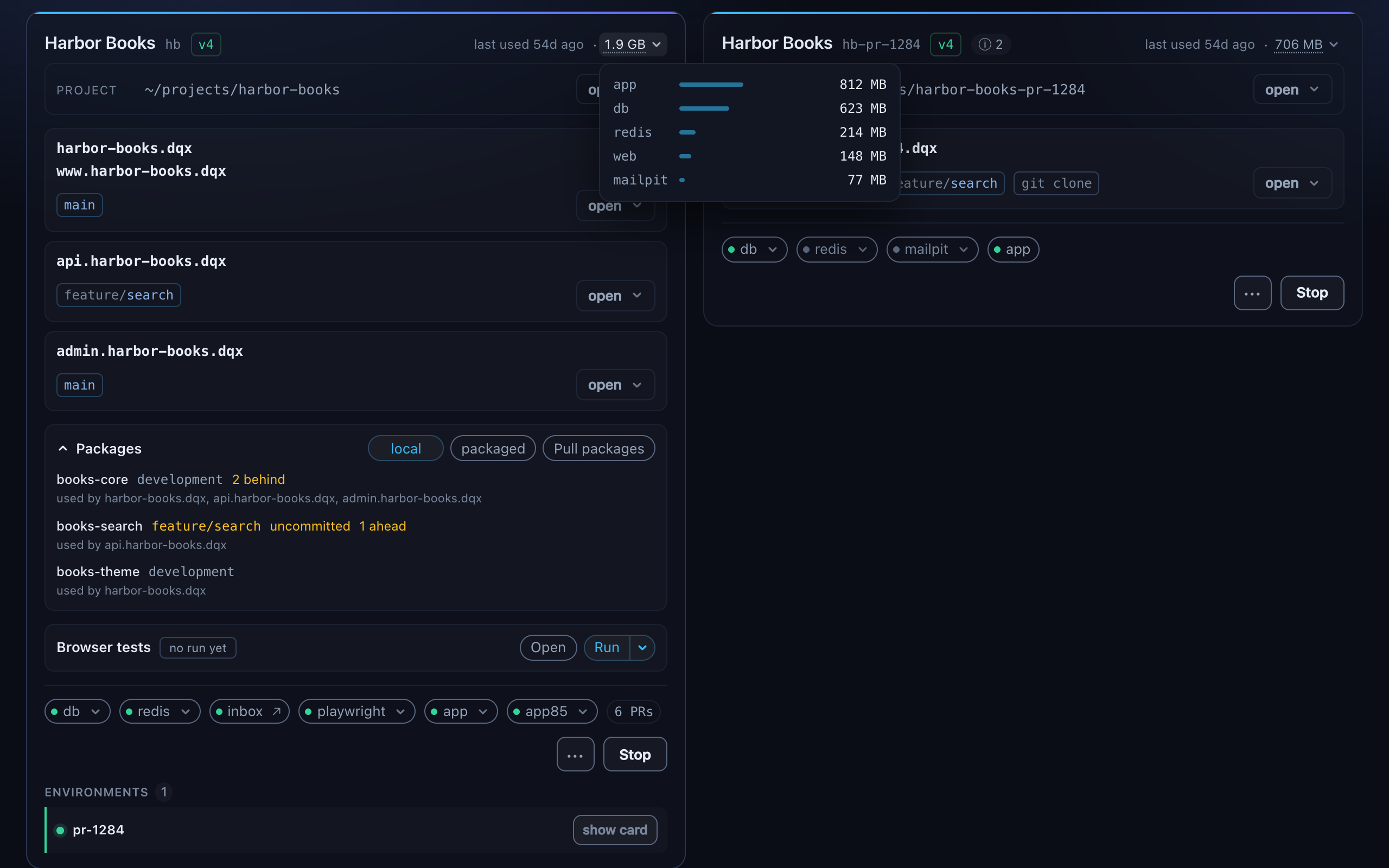
Top right on a running card is what its containers hold, and clicking it opens the breakdown:
text
  Northwind   nwd   projects   docker              1h ago   1.8 GB

      elasticsearch  ██████████████████████   1.0 GB
      horizon        ████████████             623 MB
      db             ███                      136 MB
      mailpit        ▎                         11 MB
      redis          ▎                         11 MB
      app            ▎                         10 MB
      web            ▎                          7 MB
Usually the whole answer to "why is this machine slow": one search engine with no heap cap holds more than the other six containers together.
The heading over each group carries the same figure for everything under it, and how much the machine still has:
text
RUNNING 8 4.7 GB 23.1 GB freeThe free figure is what the kernel would give back
Not os.freemem(). macOS keeps almost nothing unused: measured here it reported 1.7 GB free on a 68.7 GB machine that had 23 GB it would hand over the moment anything asked. The figure shown is free, inactive, speculative and purgeable together, read from vm_stat, which is what Activity Monitor means by available memory.
How the figure is taken
Containers are filed by the directory compose started them from, not by the key their name begins with. One project here runs a container called swoole_app beside its own <key>_app, and by name that one is nobody's: the card read 79 MB when the project was holding 412 MB. It also tells two checkouts of one client apart, which their shared key cannot.
dqx memory --details prints the same measurement grouped by name, so on a project like that the two differ, and the card is the one to believe.
Read every thirty seconds rather than on the two-second liveness pass: it is one docker stats for the whole machine. Starting or stopping from the dashboard reads again straight away, and at 3, 10 and 30 seconds after, because a container is up before the server inside it is warm. None of it holds the button up.
The figure is what the container's cgroup holds, less the file cache the kernel would drop under pressure, so a card and docker stats agree. It has nothing to do with image size: a php-fpm image of several hundred MB sits idle around 14 MB.
Read only, if you want it
dqx dashboard can start and stop projects, because that is what you opened it for. --read-only turns that off for a shared screen: the buttons are disabled, the header says read only, and the API refuses the request even if something asks directly. dqx doctor and rescan work either way.
The review tab still lists pull requests and shows reviews, but cannot start, cancel, edit or post one, and the Bitbucket token dialog is refused.
Output from a start or a stop folds itself away five seconds after it succeeded, leaving the line that says how it went. A failure never folds by itself.
Every button is a command you could run yourself
The dashboard does not start projects itself. It runs dqx up in the project's directory and shows the output, which is why it inherits every check the terminal has: whatever is holding 443, the certificate reissue, the refusal to start a stack that was never generated.
If the dashboard can do it, so can you.